星期三, 五月 30, 2007

Microsoft 正版增值诊断工具


注意,它不是"Windows 正版增值验证工具"。Microsoft 正版增值诊断工具让你不需要访问 Microsoft 网站就可以验证 Microsoft 软件的真伪,并且可以显示相关的详细信息以及解决可能遇到的一些问题:


*提供 Windows 操作系统的许可信息
*诊断并显示 Windows 和 Office 软件的正版验证详细信息
*诊断并显示 Windows 正版验证通知组件的详细信息
*诊断并显示浏览器代理和安全设置信息
*将所有诊断信息复制为文本


星期六, 五月 12, 2007

Show出你的firefox扩展

Show出你的firefox扩展

http://www.v2ex.com/topic/view/4168/1.html


这里使用firefox的不少,


大家不妨把自己使用的扩展展示出来


使用MR Tech's Local Install可以自动生成你的配置列表,选择生成bbcode格式,然后全选复制直接贴出来就可以了~~吼吼~~


powered by performancing firefox

星期三, 五月 09, 2007

特殊字符总汇


特殊字符总汇


(一)规则形状(圆形、三角形、方形、菱形)


○ ⊙ ◎ ◐ ◑ 。 。 。° º o O . · ۰ • ● ◕ ◕ ☉⊕ Θ ✪ ✪


◣◢ ◤◥ ⊿


・ ‧ ▫ ▪ □ ▣ ▓ ▒ ░ ▧ ▨ ▤ ▥ ▦ ▩ ◘ ◙ ☒ ■ ▬ 〓 ▀ ▁ ▂ ▃ ▄ ▅ ▆ ▇ █ ▋▌▍▐ ◦ ◊ ♢ ♦ ❖ ◇ ◈ ◆


(二)图形符号


♂ ♀ ♠ ♣ ♥ ♦ ♤ ♡ ◇ ♧ ❤ ❥ ☜ ☞ ☎ ☏ ♨ ☺ ☻ ﹡ * ¤ ☼ ☀ ☽ ☾ ☆ ★ ☄ ☁ ☂ ✚ ✟ ✙ ✣ ✤ ✥ ✦ ✧ ✩ ✫ ✬ ✭ ✮ ✯ ✰ ✪ ☆ ★ ❂ ❁ ❀ ✿ ✱ ✲ ✳ ❃ ✾ ✽ ✼ ✻ ✺ ✹ ✸ ✷ ✶ ✵ ✴ ❄ ❅ ❆ ❇ ❈ ❉ ❊ ❋ ✱ ☸ ❣ ❦ ❧ ✁ ✄ ☪ ☣ ☢ ☠ ☭ ❣ ♈ ☮ ✈ ✡ ✓ ✔ √ ☑ ☒ ✗ ✘ ㄨ ✕ ✖ ✖ ✎ ✏ ✐ ✌ ✍ ✉ ↂ ☯ ♛ ♕ ﹎ ₪ ¡ Þ ௫ ღ ☃ - 〝〞 ஐ ๑   ﻬ L ☊ ☋ ♋ ☌ ☍ Ξ ぷ ∞≡ o'.'o ☃ ☹ 〠 〄 ♝ ♞ ♟ ₪ ¤ 큐 〒 ⁂ ァ γ ︿ しノж ю Ю 乀 ◖◗ Ш ☃ ๑ ۩ ۞ ˇ и


(三)标点符号


︻ ︼ ︽ ︾ ︿ ﹀ ﹁ ﹂ ﹃ ﹄﹝﹞ 「」 ︵ ︶ ︷ ︸ ︹ ︺ 【】〖〗《 》 « » 〔〕﹙﹚(){}﹛﹜『』 ﹤﹥〈〉<> ≮≯ ❝❞ @ @ § ※ # ~ £ ¥ $ €


(四)表格符号


┏ ┳ ┓┏ ┯ ┓┌ ┬ ┐╔ ╦ ╗╓ ╥ ╖╒ ╤ ╕─│╭ ╮╱ ╲ ┱ ┲ ╃ ╄


┣ ╋ ┫┠ ┼ ┨├ ┼ ┤╠ ╬ ╣╟ ╫ ╢╞ ╪ ╡━ ╰ ╯╲ ╱ ┇┅ ┋


┗ ┻ ┛┗ ┷ ┛└ ┴ ┘╚ ╩ ╝╙ ╨ ╜╘ ╧ ╛═║ ︴ ﹏ ﹋ ﹌


(五)箭头符号


♂ ♂ ↑ ↓ ← → ↖ ↗ ↙ ↘ ↔ ↕ ☇ ☈ ➸ ➹ ➳➴➵ ➽ ◀ ◁ ▶ ▷ ▲ △ ▼ ▽ ◄ ► ☜ ☞


(六)音乐符号


♩ ♪ ♫ ♬ ♯♭♮


(七)上标字符


℡ ™ º ¹ ² ³ ª °


(八)数字、数学符号


⓪ ① ② ③ ④ ⑤ ⑥ ⑦ ⑧ ⑨ ⑩ ⑪ ⑫ ⑬ ⑭ ⑮ ⑯ ⑰ ⑱ ⑲ ⑳

❶ ❷ ❸ ❹ ❺ ❻ ❼ ❽ ❾


⑴ ⑵ ⑶ ⑷ ⑸ ⑹ ⑺ ⑻ ⑼ ⑽ ⑾ ⑿ ⒀ ⒁ ⒂ ⒃ ⒄ ⒅ ⒆ ⒇


⒈ ⒉ ⒊ ⒋ ⒌ ⒍ ⒎ ⒏ ⒐ ⒑ ⒒ ⒓ ⒔ ⒕ ⒖ ⒗ ⒘ ⒙ ⒚ ⒛


ⅰ ⅱ ⅲ ⅳ ⅴ ⅵ ⅶ ⅷ ⅸ ⅹ ⅺ ⅻ


Ⅰ Ⅱ Ⅲ Ⅳ Ⅴ Ⅵ Ⅶ Ⅷ Ⅸ Ⅹ Ⅺ Ⅻ


㊀ ㊁ ㊂ ㊃ ㊄ ㊅ ㊆ ㊇ ㊈ ㊉


㈠ ㈡ ㈢ ㈣ ㈤ ㈥ ㈦ ㈧ ㈨ ㈩


№ ⅛ ¼ ⅜ ½ ⅝ ¾ ⅞ ⅓ ⅔


+ - × ÷ ± + - = ≡ ≠ ≒ ≈ ≌ ~ ~﹢ ╳ ⊕ Θ % % ‰ ∵ ∴ ∷ ∏ < > ≦ ≧ ≤ ≥﹤ ﹥∩ ∪ ∈ ¢ ° ⊥ ∠ ∟ ⊿ △ ㏒ ∑ ∂ ∫∮∞( 〔 ﹙﹚ 〕) { ﹛﹜} √ ㄨ


(九)特殊中文字符


㊐ ㊊ ㊎ ㊍ ㊌ ㊋ ㊏ ㊑ ㊒ ㊓ ㊔ ㊕ ㊖ ㊗ ㊘ ㊜ ㊝ ㊞ ㊟ ㊠ ㊡ ㊢ ㊩ ㊪ ㊫ ㊬ ㊭ ㊮ ㊯ ㊰ ㊙ ㊚ ㊛ ㊣ ㊤ ㊥ ㊦ ㊧ ㊨


㈱ ㍿ 囍 卐 卍 ォミ灬 彡 ツ


(十)特殊西文字符


⒜ ⒝ ⒞ ⒟ ⒠ ⒡ ⒢ ⒣ ⒤ ⒥ ⒦ ⒧ ⒨ ⒩ ⒪ ⒫ ⒬ ⒭ ⒮ ⒯ ⒰ ⒱ ⒲ ⒳ ⒴ ⒵


ⓐ ⓑ ⓒ ⓓ ⓔ ⓕ ⓖ ⓗ ⓘ ⓙ ⓚ ⓛ ⓜ ⓝ ⓞ ⓟ ⓠ ⓡ ⓢ ⓣ ⓤ ⓥ ⓦ ⓧ ⓨ ⓩ


Ⓐ Ⓑ Ⓒ Ⓓ Ⓔ Ⓕ Ⓖ Ⓗ Ⓘ Ⓙ Ⓚ Ⓛ Ⓜ Ⓝ Ⓞ Ⓟ Ⓠ Ⓡ Ⓢ Ⓣ Ⓤ Ⓥ Ⓦ Ⓧ Ⓨ Ⓩ


[̲̅A̲̅][̲̅B̲̅][̲̅C̲̅][̲̅D̲̅][̲̅E̲̅][̲̅F̲̅][̲̅G̲̅][̲̅H̲̅][̲̅I̲̅][̲̅J̲̅][̲̅K̲̅][̲̅L̲̅][̲̅M̲̅][̲̅N̲̅][̲̅O̲̅][̲̅P̲̅][̲̅Q̲̅][̲̅R̲̅][̲̅S̲̅][̲̅T̲̅][̲̅U̲̅][̲̅V̲̅][̲̅W̲̅][̲̅X̲̅][̲̅Y̲̅][̲̅Z̲̅]


à á â ã ä å æ ç è é ê ë ì í î ï ð ñ ò ó ô õ ö ø ù ú û ü ý þ ÿ ō ǒ ǎ


À Á Â Ã Ä Å Æ Ç È É Ê Ë Ì Í Î Ï Ð Ñ Ò Ó Ô Õ Ö Ø Ù Ú Û Ü Ý Þ ß ε ф μ ξ ζ ω Ω ψ Ψ Café


a b c d e f g h i j k l m n o p q r s t u v w x y z


A B C D E F G H I J K L M N O P Q R S T U V W X Y Z


© ® ℗ ℃ ℉ Ω ㏎ 


(十一)时间与日期


㍘ ㍙ ㍚ ㍛ ㍜ ㍝ ㍞ ㍟ ㍠ ㍡ ㍢ ㍣ ㍤ ㍥ ㍦ ㍧ ㍨ ㍩ ㍪ ㍫ ㍬ ㍭ ㍮ ㍯ ㍰


㋀ ㋁ ㋂ ㋃ ㋄ ㋅ ㋆ ㋇ ㋈ ㋉ ㋊ ㋋


㏠ ㏡ ㏢ ㏣ ㏤ ㏥ ㏦ ㏧ ㏨ ㏩ ㏪ ㏫ ㏬ ㏭ ㏮ ㏯ ㏰ ㏱ ㏲ ㏳ ㏴ ㏵ ㏶ ㏷ ㏸ ㏹ ㏺ ㏻ ㏼ ㏽ ㏾


(十二)注音符号


ㄅ ㄆ ㄇ ㄈ ㄉ ㄊ ㄋ ㄌ ㄍ ㄎ ㄏ ㄐ ㄑ ㄒ ㄓ ㄔ ㄕ ㄖ ㄗ ㄘ ㄙ ㄚ ㄛ ㄜ ㄝ ㄞ ㄟ ㄠ ㄡ ㄢ ㄣ ㄤ ㄥ ㄦ ㄧ ㄨ ㄩ 々


(十三)组合符号


表情:。◕‿◕。 。◕‿◕。 ⊙‿⊙ (◡‿◡✿) (◕‿◕✿) *⊹⊱✿◕‿◕✿⊰⊹* :-) :) ☺ ☻


(◕〝◕) ๏[-ิิ_•ิ]๏ o(‧'''‧)o べòべ ◉◞◟◉ ☼ ◦ ☼ *^_^* ^*^ ^-^ ^_^ ^︵^


⌒_⌒ ︶︹︺ 。◕‿-。 ⌒ǒ⌒ ~⌒ō⌒~ :-( ≈( ~.~ •.• •‿• p( ^ O ^ )q


文字:ⓛⓞⓥⓔ ⓜⓘⓢⓢ ⓨⓞⓤ


其他:๑۩۞۩๑ ๑۩۩๑ ☜♥☞ ╰☆╮ ╭★╯ ⊹⊱⋛⋋ ⋌⋚⊰⊹ ۰•●❀ ❀●•۰ εїз


HTML颜色代码


FFFFFF

FFFFCC

FFFF99

FFFF66

FFFF33

FFFF00

CCFFFF

CCFFCC

CCFF99

CCFF66

CCFF33

CCFF00

99FFFF

99FFCC

99FF99

99FF66

99FF33

99FF00

66FFFF

66FFCC

66FF99

66FF66

66FF33

66FF00

33FFFF

33FFCC

33FF99

33FF66

33FF33

33FF00

00FFFF

00FFCC

00FF99

00FF66

00FF33

00FF00

FFCCFF

FFCCCC

FFCC99

FFCC66

FFCC33

FFCC00

CCCCFF

CCCCCC

CCCC99

CCCC66

CCCC33

CCCC00

99CCFF

99CCCC

99CC99

99CC66

99CC33

99CC00

66CCFF

66CCCC

66CC99

66CC66

66CC33

66CC00

33CCFF

33CCCC

33CC99

33CC66

33CC33

33CC00

00CCFF

00CCCC

00CC99

00CC66

00CC33

00CC00

FF99FF

FF99CC

FF9999

FF9966

FF9933

FF9900

CC99FF

CC99CC

CC9999

CC9966

CC9933

CC9900

9999FF

9999CC

999999

999966

999933

999900

6699FF

6699CC

669999

669966

669933

669900

3399FF

3399CC

339999

339966

339933

339900

0099FF

0099CC

009999

009966

009933

009900

FF66FF

FF66CC

FF6699

FF6666

FF6633

FF6600

CC66FF

CC66CC

CC6699

CC6666

CC6633

CC6600

9966FF

9966CC

996699

996666

996633

996600

6666FF

6666CC

666699

666666

666633

666600

3366FF

3366CC

336699

336666

336633

336600

0066FF

0066CC

006699

006666

006633

006600

FF33FF

FF33CC

FF3399

FF3366

FF3333

FF3300

CC33FF

CC33CC

CC3399

CC3366

CC3333

CC3300

9933FF

9933CC

993399

993366

993333

993300

6633FF

6633CC

663399

663366

663333

663300

3333FF

3333CC

333399

333366

333333

333300

0033FF

0033CC

003399

003366

003333

003300

FF00FF

FF00CC

FF0099

FF0066

FF0033

FF0000

CC00FF

CC00CC

CC0099

CC0066

CC0033

CC0000

9900FF

9900CC

990099

990066

990033

990000

6600FF

6600CC

660099

660066

660033

660000

3300FF

3300CC

330099

330066

330033

330000

0000FF

0000CC

000099

000066

000033

000000


星期六, 四月 28, 2007

[插件]站内搜索(SearchThisSite)


1.0RC1 (070426)

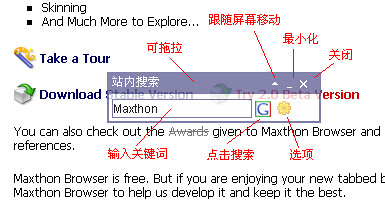
+ 跟随屏幕移动开关

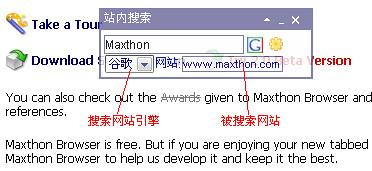
* 所有搜索引擎都能搜索任何网页, 没有编码限制

* CSS修正


http://forum.maxthon.cn/index.php?showtopic=19190


运行方法1:

先选要搜索的文字, 运行插件后自动复制到搜索框, 并会自动新开一个搜索窗口.

就是选文字, 运行插件马上搜索.


运行方法2:

不选文字运行插件后, 在"站内搜索"界面上手动粘贴文字, 然后按右边的图片按钮, 会新开一个搜索窗口. 最右边的图片按钮按下后会出现更多设置.


运行方法3:

不选文字运行插件后, 把要搜索的文字直接拖到"站内搜索"界面上的输入框, 会自动新开一个搜索窗口.

[插件]link alert (链接提示)

序言

最近发现OPERA的link-alert userjs不错, 自己写了一个maxthon能用的, 大家试试吧. maxthon 1.x 2.0 通用.


功能

当鼠标放在网页上的某些链接上时在鼠标下面会出现相应的图标, 如链接是PDF就出现PDF图标, 一般常用的格式都具备了.

插件会自动运行, 原来有onmouseover或onmouseout事件(event)的链接不会置换事件.


截图


历史

1.02

+ MT2.0 RC1 插件自动运行支持

+ 支持大部分论坛附件

* 修正探测功能, 默认关闭某些不常用的链接和格式令速度更快, 如Java文件.

想要打开的话, 可以删除linkalert.htm中的MatchList里面的相应注释.

* 修正图标透明问题

* 修正不能安装问题


1.01

* IE7兼容


下载

1.02

http://forum.maxthon.cn/index.php?showtopic=4315


测试页

测试页 @googlepages


请安装linkalert后到测试页做全面测试, 也可以运行插件后在下面测试部分功能.

Images (不要点击)

Movies (不要点击)

Flash (不要点击)

Audio files (不要点击)

Zip files (不要点击)

Text files (不要点击)

Torrent downloads (不要点击)

PDF documents (不要点击)

RSS feeds (不要点击)

Word documents (不要点击)

Excel spreadsheets (不要点击)

PowerPoint presentations (不要点击)

JavaScript files (不要点击)

Executables and other potentially dangerous files (不要点击)

星期二, 四月 17, 2007

浮上

Long time no update la. tongue


最近加入maxthon插件组, 又要开始忙了.

星期四, 一月 11, 2007

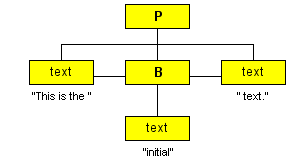
The Document Tree


http://www.brainjar.com/dhtml/intro/default3.asp


Nodes
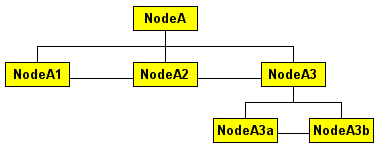


The Node object provides several properties to reflect this structure and allow you to traverse the tree. Here are some relationships using the example above:


  • NodeA.firstChild = NodeA1

  • NodeA.lastChild = NodeA3

  • NodeA.childNodes.length = 3

  • NodeA.childNodes[0] = NodeA1

  • NodeA.childNodes[1] = NodeA2

  • NodeA.childNodes[2] = NodeA3

  • NodeA1.parentNode = NodeA

  • NodeA1.nextSibling = NodeA2

  • NodeA3.prevSibling = NodeA2

  • NodeA3.nextSibling = null

  • NodeA.lastChild.firstChild = NodeA3a

  • NodeA3b.parentNode.parentNode = NodeA


The Node interface also provides methods for dynamically adding, updating and removing nodes such as:


  • insertBefore()

  • replaceChild()

  • removeChild()

  • appendChild()

  • cloneNode()


This interface provides methods for accessing and creating other nodes in the document tree. Some methods are:


  • getElementById()

  • getElementsByTagName()

  • createElement()

  • createAttribute()

  • createTextNode()


Traversing the Document Tree


Consider the following:


<html>
<head>
<title></title>
</head>
<body><p>This is a sample paragraph.</p></body>
</html>

and this code:


alert(document.documentElement.lastChild.firstChild.tagName);

which would display "P", the name of the tag represented by that node. The code breaks down as follows:


  • document.documentElement - gives the page's HTML tag.

  • .lastChild - gives the BODY tag.

  • .firstChild - gives the first element in the BODY.

  • .tagName - gives that element's tag name, "P" in this case.


Accessing Elements Directly


<p id="myParagraph">This is a sample paragraph.</p>

...

alert(document.getElementById("myParagraph").tagName);


-----------------


var nodeList = document.getElementsByTagName("A");
for (var i = 0; i < nodeList.length; i++)
nodeList[i].style.color = "#ff0000";


Attributes


<p id="sample1" align="left">Text in a paragraph element.</p>

... code for the links ...

document.getElementById('sample1').setAttribute('align', 'left');
document.getElementById('sample1').setAttribute('align', 'right');


Text Nodes


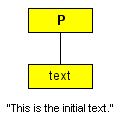
<p id="sample1">This is the initial text.</p>

... code for the links ...

document.getElementById('sample1').firstChild.nodeValue =
'Once upon a time...';
document.getElementById('sample1').firstChild.nodeValue =
'...in a galaxy far, far away';


--------------------------


<p id="sample2">This is the <b>initial</b> text.</p>


星期六, 十二月 16, 2006

Claim Your Blog Using Post Claim


All you need to do is create a post using the code below and publish it to your blog! After Technorati's spiders have seen it, you can delete it. (You'll know they've seen it when you come to your Technorati account page and this blog shows as claimed, and not "in progress").


Blogger Posting Instructions


  1. Step 1: In another web browser window, log in to your Blogger account

  2. Step 2: On the Blogger Dashboard, click on your blog name

  3. Step 3: Click "Create" to create a new post

  4. Step 4: Copy the code below, then paste it into the main text box of your new post with any Title


  5. Step 5: Click "Publish Post" to save.


Check to make sure your new post is live, then you're ready to proceed.


Technorati Profile


Technorati :

星期五, 十二月 15, 2006

Flash 与外部通讯的所有方法 [转]

Macromedia 提供的一份文档《 Flash Player 8 安全相关API 》为我们揭示了 Flash 所有的外部通讯方法

这里所说的"外部"定义很广泛,包括后台应用程序,系统和用户,前台交互.


1,Flash 与后台应用程序之间的通讯方法,Kinglong已经写完了.

2,与系统和用户的交互包括获取用户键盘输入,鼠标点击,摄像头,麦克风的操作等等.

3,前台交互指Flash(SWF 和 SWF 文件之间交换和共享数据),Flash 和 JavaScript(Ajax) 交换与共享数据.


基本上就是这么多,万变不离其中.

如果没有以上的那些元素,也就没有Flash RIA.


Danger's Blog 那里抄来的,自己收集一下.